Your Microsoft 365 bill just increased by 18%, and nobody can explain why. Same headcount. Same usage patterns. But the invoice keeps climbing month after month.
Here's what's happening: you're paying for three people who left in January, two who moved to roles that don't need full access, and five who never logged in after training. Ten unnecessary licenses at £60/month each. That's £7,200 a year on software that delivers zero value.
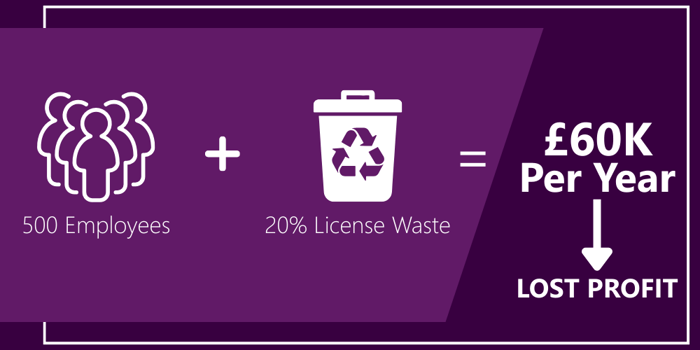
Scale that across a business with 500 users and a typical 20% waste, and you're looking at £60,000 annually. The opportunity cost is significant. Forrester Research found that businesses achieve 223% ROI from properly optimised Microsoft 365 deployments. That return depends on people using what you've bought. Paying for licenses nobody touches eliminates the productivity gains that justify the investment.
The Real Cost of Poor Microsoft 365 License Management
Most CFOs see Microsoft 365 as a fixed cost. It isn't. It's a variable cost nobody's managing, so it only goes up.
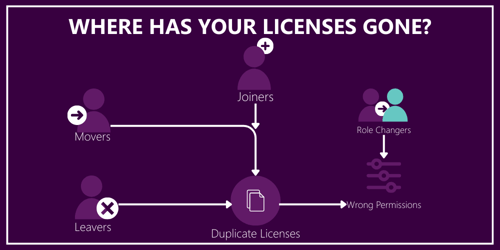
Every employee who leaves keeps their license for an average of three weeks before IT catches it. Every role change means someone keeps the expensive license they don't need anymore. Every new starter gets provisioned two weeks early because that's how long manual processes take. Every project that ends leaves behind licenses that nobody remembers to remove.
The maths compounds quickly. A business with 500 employees and 10% annual turnover processes 50 leavers per year. Three weeks of lag per leaver equals 150 unnecessary license weeks. At £15/week for Business Premium, that's £2,250 wasted just on people who no longer work there. Add in over-provisioned licenses for current staff and the waste compounds.
But direct waste is only half the problem. You've also got:
Budget opacity. You know what you're paying, but not why. When the board asks why Microsoft 365 costs keep increasing, you're guessing. When IT requests more budget, you can't separate genuine growth from accumulated waste.
Compliance exposure. Under-licensing creates audit risk. Over-licensing wastes money. Neither is acceptable, but without regular audits, you won't know which problem you have until Microsoft or a regulator asks to see your license reconciliation.
Productivity loss. People can't use features they don't have access to. Someone who needs Power BI for reporting but only has Business Basic is working around the limitation, probably using Excel in ways that create data integrity problems. Forrester's analysis shows the ROI of Microsoft 365 comes from productivity gains, not just license costs. Unused licenses mean you're paying for potential productivity you're not capturing.
Renewal shocks. Annual renewals arrive with 12 months of accumulated waste. You're negotiating from weakness because reducing licenses means admitting you've been overpaying.
Why Finance Can't Fix This Alone
The data exists in Microsoft's admin portal, but pulling it requires IT access and technical knowledge. Interpreting it requires understanding what each license type includes and matching that to job roles. Acting on it means coordinating with IT to make changes, notifying users, and dealing with objections when someone's license gets downgraded.
This isn't finance work, and it isn't IT work. It's optimisation work that falls between both teams, which means it doesn't get done. IT doesn't have visibility into business roles and cost implications. Finance doesn't have visibility into technical capabilities and usage patterns.
Meanwhile, licensing complexity keeps increasing. Microsoft introduces new bundles, changes pricing structures, and updates feature sets. The New Commerce Experience changed how CSP licensing works. Enterprise Agreements have different rules. Keeping up requires dedicated attention that neither finance nor IT can spare.
How to Stop the Waste
Six changes will cut your Microsoft 365 costs without reducing what your teams can do.
Track Usage, Not Assumptions
Your admin centre shows who has licenses. Usage reports show who's using them. The gap is where you're wasting money. Someone with Business Premium who hasn't opened desktop Office apps in 90 days needs Business Basic. A user with E5 who's never touched advanced compliance features could move to E3. Five accounts with zero logins for 60 days should be investigated.
Monthly usage analysis spots problems whilst they're manageable. Quarterly service management meetings turn data into decisions. Most businesses find that 10-20% of licenses can be downgraded, removed, or reallocated after the first review.
Match Licenses to Roles
Not everyone needs Microsoft 365 Business Premium. Operations staff, warehouse workers, and administrators typically need email and documents. Business Basic covers this. Finance analysts and project managers need desktop Office applications. Business Standard fits. Only users requiring advanced security, device management, or compliance tools need Business Premium.
Define standard profiles: warehouse supervisor gets Business Basic, finance analyst gets Business Standard, department head gets Business Premium. When IT provisions accounts, they select templates rather than defaulting to the most expensive option. Role changes should trigger automatic license adjustments.
Automate Provisioning and De-Provisioning
When HR systems flag departures, licenses get removed immediately rather than weeks later. When someone joins, licenses activate on their first day rather than two weeks early. Role changes trigger adjustments automatically.
This eliminates the three-week lag that costs £2,250 annually per 50 leavers. More importantly, it gives you accurate license counts in real time rather than discovering waste during annual reviews.
Choose the Right Purchasing Model
Cloud Solution Provider (CSP) agreements offer flexibility with monthly or annual terms. You can adjust licenses relatively easily, making CSP suitable for fluctuating headcount. Monthly terms cost 20% more than annual but provide maximum flexibility. Annual NCE subscriptions lock in pricing against Microsoft's periodic increases.
Enterprise Agreements (EA) offer lower per-license rates through volume commitments (500+ users minimum) and three-year terms. This works for businesses with stable headcount where you're confident about long-term needs. Annual true-ups catch you out if you've significantly under-licensed.
Most mid-market businesses benefit from CSP's adaptability. Core licenses for a stable workforce go on annual subscriptions. Variable capacity for seasonal staff uses monthly terms.
Train People to Use What You've Bought
Unused licenses often signal undertrained teams. If people don't know that Teams can replace internal email, they won't use it. If they've never seen Power Automate, they won't use it to eliminate repetitive tasks.
Track which Microsoft 365 features teams use and which they ignore:
- Teams for collaboration or just instant messaging?
- Anyone using Planner for project management?
- Has anyone discovered Forms for surveys?
- Do people know SharePoint can replace network drives?
Training resources can bridge the gap between license costs and productivity gains. When people understand how Teams replaces internal email, how OneDrive enables mobile access, or how Power Automate eliminates repetitive tasks, adoption increases, and you capture the ROI that justifies the investment.
Monitor Systematically
Microsoft 365's admin centre provides basic reporting, but you're manually comparing data and spotting patterns. Centralised platforms aggregate usage data, highlight optimisation opportunities, and automate routine tasks. AI-driven tools identify unused licenses, suggest downgrades, and flag accounts that haven't logged in for extended periods.
Monthly monitoring catches issues whilst they're manageable. Quarterly reviews turn usage data into budget decisions. Real-time visibility shows exactly where your spend goes, and systematic processes ensure changes actually happen rather than sitting on someone's task list.
Take Control of Your Microsoft 365 Spend
Twenty per cent license waste is typical across mid-market businesses. The waste accumulates silently until renewal when you're negotiating from weakness.
Monthly monitoring catches problems early. Automated provisioning stops waste before it starts. Quarterly service management meetings turn usage data into budget decisions. Most importantly, you get visibility into where Microsoft 365 costs are going and why they're changing.
For businesses managing hundreds of Microsoft 365 licenses, the question isn't whether you could optimise costs. It's whether your finance team has time to do the technical analysis or your IT team has time to do the business analysis. Most don't.
TSG's Cloud Care provides monthly usage analysis to identify waste, quarterly reviews to assess performance and costs, and real-time visibility through the OneView portal. Changes get actioned rather than becoming another project for your already-stretched IT team. TSG Academy training ensures your people know how to use what you're paying for, turning license costs into productivity gains. The service typically pays for itself through eliminating waste within three months.
Frequently Asked Questions
What's the difference between Microsoft 365 Business and Office 365 from Microsoft?
Office 365 was rebranded as Microsoft 365 in 2020, adding security and device management capabilities. Current options are Business Basic (web apps), Business Standard (adds desktop Office), and Business Premium (adds advanced security). The name change reflects Microsoft's shift from standalone apps to integrated cloud services.
How often should we review Microsoft 365 license assignments?
Monthly monitoring catches waste before it accumulates, though quarterly reviews are the practical minimum. Usage patterns change constantly with staff movement and role changes. Monthly reviews prevent a twelve-month accumulation of unused licenses that creates renewal shocks. Quarterly service management meetings turn usage data into optimisation decisions whilst the information is current.
Can we mix different Microsoft 365 license types in one organisation?
Yes, and you should. Role-based licensing means sales might need Business Premium for advanced collaboration, whilst operations need Business Basic for email and documents. Finance analysts might justify Business Standard for desktop Excel, whilst warehouse staff work fine with Business Basic. Matching license tiers to role requirements rather than giving everyone the same level is where most businesses find 10-20% savings.
What happens to a user's data when we remove their Microsoft 365 license?
Microsoft 365 retains user data (emails, OneDrive files, SharePoint content) temporarily after license removal, but data becomes inaccessible and is eventually deleted. TSG recommends implementing backup solutions like Veeam or Azure Backup before removing licenses, combined with automated joiner/mover/leaver processes. This prevents both data loss and unnecessary license costs from delayed account closure.
How do Enterprise Agreements differ from CSP for Microsoft 365 licensing?
Enterprise Agreements need three-year commitments with 500+ users minimum, offering volume discounts and price protection but limited flexibility to reduce licenses mid-term. CSP (Cloud Solution Provider) offers monthly, annual, or three-year terms with flexible scaling. Monthly CSP costs 20% more but allows license adjustments each month. Annual CSP locks in pricing with moderate flexibility. Most businesses with 100-1,000 employees benefit from CSP's adaptability, reserving EA for stable core workforce once headcount exceeds 500 users consistently.
Do we need separate licenses for Microsoft Teams?
Teams is included in Microsoft 365 Business subscriptions at Business Basic level and above. Standard functionality like chat, meetings, and collaboration needs no additional licenses. Advanced features like Teams Phone (replacing phone systems), Teams Premium (AI features), and Teams Rooms (meeting room equipment) require add-on licenses. Most businesses start with included functionality and add specialised licenses only when requirements demand them.


.svg)

.svg)