
Your monthly Microsoft 365 bill keeps climbing, but you can't explain where the money goes. Security configurations sit at default settings. The tools are there; the value isn't.
This guide shows you how Microsoft 365 with Cloud Care delivers the collaboration, compliance and cost control your workforce needs.
The Microsoft 365 Paradox: Powerful Tools, Wasted Investment
Most organisations use less than half of what they're paying for while simultaneously missing critical capabilities they actually need.
Seamless collaboration through Teams, SharePoint and OneDrive replaces email chains and scattered files. Security and compliance features protect your data and defend against threats. Mobile productivity lets your people access everything from anywhere. Business continuity through backup and recovery keeps you operational when things go wrong.
Three Problems Hiding in Your Microsoft Environment
Licence chaos drains budgets. Ghost accounts from leavers cost £15 per month. Users sit on Business Premium licences when they only need Basic. Annual true-ups reveal hundreds of unused seats. For mid-sized businesses, this costs £20,000-£50,000 annually.
Security assumptions create exposure. Your Microsoft Secure Score (Microsoft's 0-100% security rating) sits at 40% when it should be 80%+. Multi-factor authentication (requiring two forms of login proof) isn't enforced. Data Loss Prevention policies (which prevent confidential data from leaving your business) aren't configured. Sharing settings are wide open. Security breaches are costly and damaging to UK businesses.
Nobody's managing the investment. Your IT team firefights rather than optimises. Adoption metrics aren't tracked. Usage patterns remain unknown. Productivity gains sit on the table untouched while competitors who manage Microsoft 365 properly pull ahead.
Five Signs You're Wasting Microsoft 365 Spend
Ghost accounts still active. Former employees' licences remain assigned months after they've left. You're paying for productivity tools nobody's opened in months.
Manual provisioning takes hours. New starters wait days for access. Leavers' accounts stay active because nobody remembered to remove them. Role changes require IT tickets and follow-up.
You can't explain your Microsoft bill. Finance sees the total but can't identify what's driving the increases month-over-month—no visibility into which users have which licences or what they actually use.
Users stuck with software they don't understand. Teams sits unused whilst email chains continue. SharePoint exists, but nobody knows how to structure it. Power BI licences assigned, but reports are still built in Excel.
No regular usage reviews. Last time anyone checked licence allocation was... never? Or maybe during the initial purchase. Meanwhile, you're paying for resources sitting idle.
Organisations addressing these issues typically save 20% or more within three months.
Why Microsoft 365 Management Fails
The Visibility and Expertise Gap
You can't manage what you can't see. Microsoft's admin portal shows licence counts but not usage patterns. Who's using Teams versus who just has it assigned? Where are your security vulnerabilities? What's driving cost increases?
Specialist knowledge required: licensing optimisation, security configuration, compliance management, user adoption strategies, integration architecture, backup and disaster recovery. Your IT team knows some of this. Nobody knows all of it. For complete coverage, you'd need three specialists at £45,000-£65,000 each, plus ongoing training as Microsoft releases 100+ updates monthly.
Most businesses cannot justify this investment.
The DIY Assumption
"We'll figure it out ourselves" works until a leaver takes business-critical data because you had no Data Loss Prevention policies. Or ransomware encrypts your SharePoint because you had no tested backup. Or a compliance audit reveals data retention failures, and substantial ICO fines follow. Or a security breach exposes customer data at significant cost.
The "Support Contract" Misunderstanding
Many businesses have Microsoft 365 "support" that's reactive, break-fix only. No proactive monitoring. No optimisation reviews. No cost management. No adoption strategy. No backup solutions.
Worth asking: "When did our IT partner last show us where we're wasting money on Microsoft 365?" If the answer is "never," you're getting break-fix support, not management.
What Comprehensive Microsoft 365 Management Looks Like
Licensing: Pay for What You Use
Monthly optimisation tracks usage for every user, identifies ghost accounts, catches duplicate licences and wrong tier assignments. Automated processes handle joiners, movers and leavers. Quarterly reviews show cost trends and optimisation opportunities.
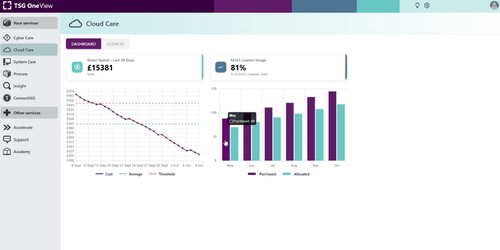
Typical mid-sized businesses reduce Microsoft 365 spend significantly within the first quarter without losing functionality. One View portal provides dashboards showing total spend, usage rates, optimisation opportunities and compliance status. Finance directors get visibility they've never had before.
Security and Compliance: Built In
Monthly Secure Score reviews, prioritised security improvements, implementation of recommended actions, and documentation for audits. Critical configurations include:
- Multi-factor authentication enforcement (two-step login verification)
- Conditional Access policies (location and device-based controls)
- Data Loss Prevention (preventing confidential data from leaving your organisation)
- Information Protection (automatically classifying and protecting documents)
- Advanced Threat Protection (blocking phishing, malicious links and attachments)
Microsoft does not provide comprehensive backup for Microsoft 365. They provide short-term retention and version history, but not protection against ransomware, long-term recovery, or point-in-time restoration. Cloud Care includes third-party backup solutions for Exchange, SharePoint, OneDrive and Teams with tested recovery procedures.
Compliance management covers data retention policies, e-discovery capabilities, GDPR monitoring, audit logging and regular reviews.
Fitzallan, an independent financial advisor handling sensitive client data, had no internal IT team. After a suspected security incident, they recognised the need for proactive cyber security despite already having a strong foundation.
Through a 10-year partnership with TSG, Fitzallan upgraded to Microsoft 365 Business Premium and subscribed to Cloud Care for Microsoft 365 management alongside Cyber Care for broader security protection. TSG OneView dashboards provided daily visibility into cyber security activity with direct access to specialists. Strong cyber security foundation, functioning like a business with IT specialism despite no internal IT expertise.
Productivity Enhancement: Making Microsoft 365 Work
Tracking adoption is straightforward: Teams adoption rates, SharePoint usage, OneDrive synchronisation, application usage and collaboration patterns.
End-user support includes help desk coverage, adoption campaigns, Champions programmes and change management for new features. TSG Academy provides training that turns licence costs into productivity gains, with courses designed to help users make better use of the software investment. Leadership programmes help executive teams optimise their Microsoft 365 strategy.
Collaboration workflow optimisation provides proper Teams architecture, SharePoint design that makes sense, OneDrive policies and integration with business applications.
BioPhorum demonstrates what's possible at scale. Managing 150+ workstreams with thousands of biopharmaceutical experts across 12 collaborative networks, they needed real-time collaboration and a single source of truth. Google applications couldn't handle the complexity.
TSG delivered Platform One, a Microsoft-led solution managing thousands of project team members. Project teams collaborate on documents instantly using SharePoint. IT onboarding steps were reduced by more than half through automated processes. Coordination that used to take days now happens in near real-time using Power BI.
Azure Infrastructure Management
For businesses using Azure alongside Microsoft 365, Cloud Care extends management to infrastructure.
Azure Cost Management provides real-time spend monitoring, budget alerts, resource optimisation recommendations and cost allocation. Performance optimisation includes VM right-sizing (matching server capacity to actual needs), Azure Virtual Desktop optimisation (auto-scaling and scheduled shutdowns), storage tier optimisation and unused resource identification. Backup and recovery covers configuration, testing, disaster recovery planning and business continuity.
Honeycomb Group, a social housing provider, discovered its traditional infrastructure couldn't support growth. Eighty servers, patchy security and systems making remote working difficult. The pandemic exposed how unprepared they were.
TSG migrated 80+ servers to Azure, deployed Microsoft 365 and Teams, and implemented proper cyber security. Remote working now works. Modern, secure infrastructure replaced surprise server bills with predictable costs.
How Microsoft 365 Management Works with Cloud Care
Cloud Care is a partnership requiring clear expectations, defined responsibilities and ongoing engagement.
Three Service Tiers
All tiers include Microsoft 365 Business Premium licensing, quarterly optimisation reviews, One View portal access, Connect 365 portal, Named Operations Manager and Dedicated Onboarding Engineer.
Licensing handles monthly licence reviews, reallocation recommendations, cost optimisation analysis and quarterly reports. Best for businesses with internal IT needing cost control. Typical savings: significant reduction within the first quarter.
M365 Optimisation (Recommended) adds end-user support, usage analytics, automated joiners/movers/leavers, Secure Score reviews, device lifecycle management (automatic laptop and phone configuration through Intune and Autopilot) and productivity reviews. Best for businesses without dedicated M365 expertise. Typical outcomes: cost savings plus significant productivity improvement.
Azure Optimisation adds Azure Cost Management, VM right-sizing, reserved instance reviews, Azure Virtual Desktop optimisation, backup and recovery testing, storage tier optimisation and uptime monitoring. Best for businesses running Azure alongside Microsoft 365. Typical outcomes: M365 benefits plus substantial Azure cost reduction.
Onboarding and Ongoing Management
Onboarding takes 5+ weeks, covering environment assessment, quick wins implementation and strategic configuration. Your Dedicated Onboarding Engineer handles implementation and knowledge transfer.
Monthly activities include licence reviews, Secure Score monitoring, security incident response, cost analysis and backup verification. Quarterly reviews examine cost trends, usage patterns, security posture, optimisation opportunities and strategic recommendations.
Proactive monitoring watches continuously for Secure Score changes, cost anomalies, service health issues, security threats and compliance drift.
Your Responsibilities
We need administrative access to your systems, a primary point of contact who can make decisions and approve changes, participation in quarterly reviews from senior leadership, approval for maintenance windows, and communication about organisational changes.
What we don't need from you: daily Microsoft 365 management, licensing expertise, time troubleshooting user issues, worry about security configuration, or stress about investment value.
What Success Looks Like: 12 Months In
After 12 months, typical outcomes include:
Microsoft 365 costs reduced significantly. Azure costs cut through right-sizing. No surprise bills. Clear spending visibility.
Secure Score substantially improved. Backup tested and working. Compliance policies configured. Zero security incidents from misconfiguration. Audit-ready documentation.
Teams adoption substantially increased. Document collaboration is working. Email volume reduced. Information retrieval faster. Mobile productivity enabled.
IT teams are freed from firefighting Microsoft 365 issues.
Making Microsoft 365 Work for Your Workforce
Microsoft 365 is powerful. Complexity at scale defeats most organisations.
Businesses of your size typically overpay significantly for licences nobody uses, leave security gaps wide open, and miss productivity gains completely. The tools are there. The value isn't.
Cloud Care treats Microsoft 365 as critical business infrastructure requiring visibility, optimisation, security and strategic planning. Not break-fix support. Not reactive troubleshooting. Proactive management delivering collaboration, compliance and cost control.
The difference between Microsoft 365 as an expense and Microsoft 365 as a competitive advantage is management. Someone needs to watch the bill, secure the environment, drive adoption and prove the value.
Most businesses cannot justify hiring three Microsoft specialists. Cloud Care provides that expertise without the hiring costs, retention risks and training requirements.
Want to see where your Microsoft 365 spend is going? We'll show you exactly what you're paying for, what you're using, and where you're leaving money on the table. Contact TSG to start the conversation.
Frequently Asked Questions
What's the difference between Office 365 from Microsoft and Microsoft 365?
Office 365 is legacy branding for the productivity applications (Word, Excel, Outlook). Microsoft 365 includes those applications plus Windows licensing, device management through Intune, and security features through Defender. Businesses purchasing today get Microsoft 365, though many still use the old Office 365 terminology when referring to the productivity suite.
Does Microsoft 365 Business include backup?
No. Microsoft provides retention (deleted items recoverable for 30-90 days) and version history, but not backup. You need third-party solutions for protection against ransomware, long-term recovery and disaster scenarios. Cloud Care includes Microsoft 365 backup for Exchange, SharePoint, OneDrive and Teams with tested recovery procedures.
How is Cloud Care different from standard Microsoft support?
Microsoft support is break-fix reactive (something stops working, you contact them). Cloud Care is proactive management, including cost optimisation, security improvements, adoption strategies and quarterly strategic reviews. You get a Named Operations Manager who knows your business, not rotating support staff reading from scripts.
What happens if we need to cancel Cloud Care?
Minimum commitment is 36 months (industry standard for managed services). After that, you can cancel with notice. Your Microsoft 365 licences remain (you own them), but management transfers back to you. We provide full documentation and knowledge transfer to ensure a smooth transition.
How quickly can you identify Microsoft 365 cost savings?
Initial assessment is completed within the first two weeks. First optimisation recommendations (ghost accounts, wrong licence tiers) are delivered by the end of month one. Typical businesses see significant cost reduction within the first quarter. Ongoing monthly reviews ensure optimisation continues as your business changes.


.svg)
.svg)